
Board Meeting Presentation: A Decision-First Agenda
Build a board deck around the decisions the meeting must reach. Put the request, recommendation and consequences before the operating detail. One minute per slide can be a rehearsal constraint; it is not a documented standard that every board or CEO follows.

| Question | Practical answer |
|---|---|
| Decision request | Approve, reject or defer; name the deadline |
| Recommendation | One preferred option and its strongest objection |
| Evidence | Actual, plan, period and source |
| Alternatives | Cost, risk and consequence of doing nothing |
| Resolution | Owner, conditions and review date |
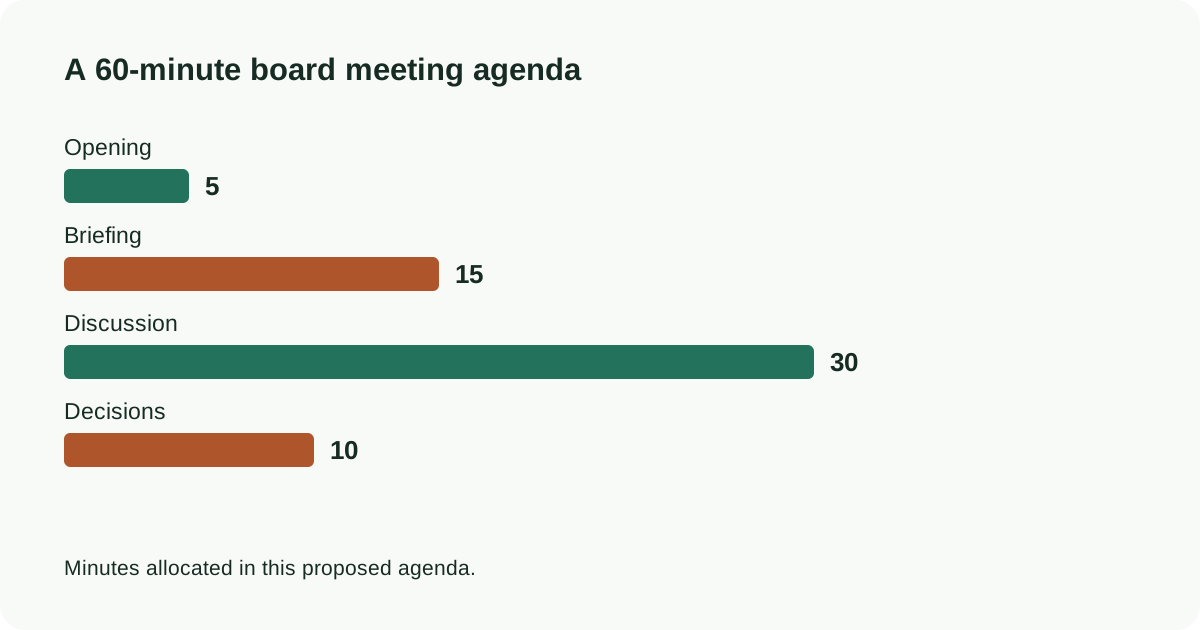
For a 60-minute meeting, reserve 5 minutes for opening, 15 for the briefing, 30 for discussion and 10 for decisions. These allocations total 60; they are a starting agenda, not a finding about board behavior. A ten-slide briefing then averages 90 seconds per slide. Move recurring metrics to a pre-read when they do not affect the decision.
Give every requested approval its own decision sentence: “Approve the proposed scope subject to the stated spending limit and review date.” Separate an approved budget from a proposal. After the meeting, record the exact resolution and conditions; do not let the deck become the only record. Pageworks can help draft from your approved brief, while the meeting owner remains responsible for the recommendation and decision record.
Put the workflow into practice
Start with your approved source in Pageworks. Review the outline, generate the deck and refine the result. Pro supports up to 50 slides and editable PowerPoint export; choose the plan that matches your handoff.
Sources and further reading
Build your next presentation with Pageworks
Editable PowerPoint with Pro — or start on Free today
Related articles
Sep 19, 2026 · 8 min read
Annual Report to Presentation: An 8-Slide Example

Feb 10, 2026 · 2 min read
QBR decks: what leadership is actually looking for
Jan 15, 2026 · 2 min read
Sales proposal decks that survive the forward chain