
Standard vs Smart: choose how to create your presentation
Standard and Smart give you two ways to turn the same idea into a presentation. Choose a familiar template and refine the outline, or let AI design each slide around your content.
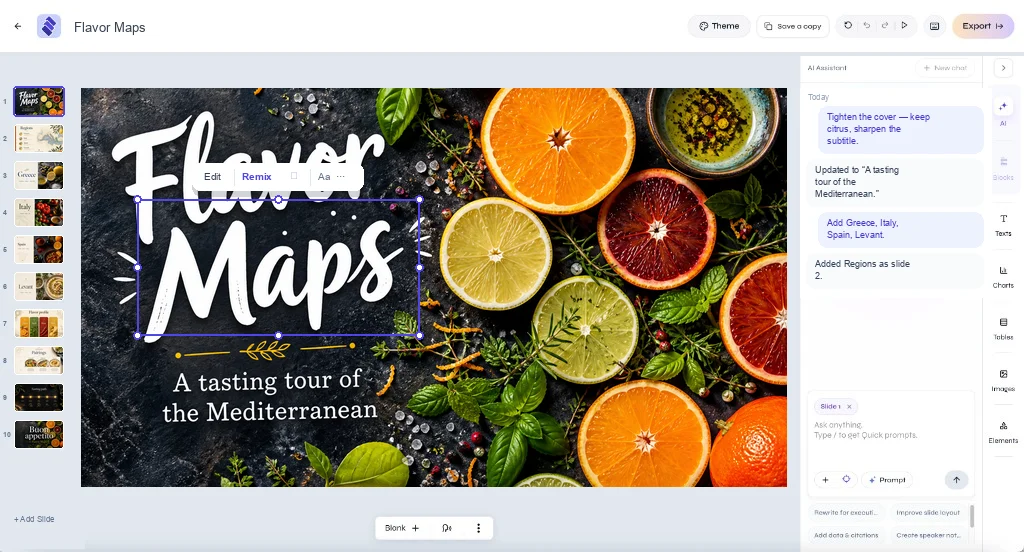
Choose your mode based on how you want to shape the first draft. Both leave you in control of the presentation you will edit and share.
Standard - outline first
Choose a template, refine the outline, and generate slides in that structure. Standard is a strong starting point when your audience expects a familiar sequence: problem, solution, market, traction, team, and funding request.
- QBR and board packs
- Sales proposals with challenge → plan → proof → close
- Presentations with an agreed length and section order
With Standard, you can refine the structure before generating. Remove sections that do not serve your goal and start with a focused draft.
Smart - story first
Smart reads the brief and composes layouts that follow the content - a tasting menu looks different from a GTM plan. Generation streams into the editor; you refine with chat in small steps.
- Creative or educational topics
- Decks where visual rhythm matters as much as section titles
- First drafts when you are not sure of the outline yet
The ten-second decision
You can mix habits
Start with a Smart draft and refine the structure in the editor. Or begin with a Standard outline and use AI editing to polish individual slides. Choose a starting point, then make the presentation your own.
What neither mode does
Pageworks does not replace your judgment on numbers, legal claims, or strategy. Both modes create a deck you can edit in the browser. Free exports PDF and slide-image PPTX; Pro includes editable PowerPoint export. The rest is still work - just not blank-slide work.
Build your next presentation with Pageworks
Make your next presentation stand out. Create with AI, make every slide your own, and unlock editable PowerPoint and watermark-free sharing with Pro.
Related articles
Mar 1, 2026 · 2 min read
Pageworks Free vs Pro: choose by the work you need to deliver
Jan 18, 2026 · 2 min read
Native PPTX export - why 'good enough' export fails teams
Dec 28, 2025 · 2 min read
Choose a presentation template that fits your meeting