Look organized from the first hello.
Your services, experience and contact details in one coherent layout. Give your company an introduction that feels considered.
CAPABILITY STATEMENT GENERATOR
Give buyers a clear reason to start a conversation. Turn your services, experience and company details into a polished capability statement.
A PDF to send. An editable PowerPoint to make it yours.
Sign in to create. Saving and export require an eligible app plan.

FOR YOUR NEXT
THE ESSENTIALS
A capability statement is a concise company introduction for a specific buyer. In this editor, you organize your services, differentiators, relevant project evidence and contact details into a single US Letter page. Review your own facts, save a private version and export a PDF to share plus an editable PowerPoint to update.
Structure reference: VA capability statement guidance (PDF).
Compare the three capability statement templatesA STRONGER FIRST IMPRESSION
Bring the essentials together in a page people can read, keep and share.
Your services, experience and contact details in one coherent layout. Give your company an introduction that feels considered.
Lead with the work that matters to this buyer. Keep a separate version for your next opportunity.
Use your own facts and wording. Save privately, revisit your document and keep an editable PowerPoint for future changes.
SEE WHAT YOU CAN MAKE
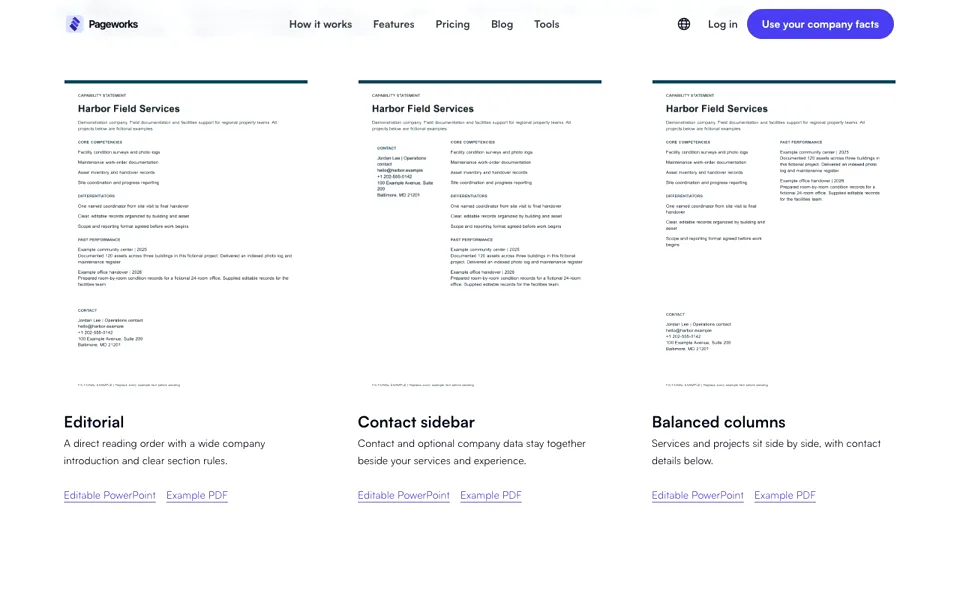
Three ways to present the same company. Choose the structure that fits your introduction.
A direct reading order with a wide company introduction and clear section rules.

Contact and optional company data stay together beside your services and experience.

Services and projects sit side by side, with contact details below.
Downloadable examples follow the page language. Changing the interface language does not translate your company document text.
Harbor Field Services is a fictional demonstration company. Replace every example fact with your own. No credentials are claimed.
FROM VAGUE CLAIMS TO SPECIFIC FACTS
Harbor Field Services is a fictional company. These edited teaching examples use invented work and numbers; they are not customer evidence or text the app generates for you.
“We provide leading business solutions.”
“Facility condition surveys and photo logs for regional property teams.”
“We deliver excellent results.”
“Documented 120 assets across three buildings and delivered an indexed photo log and maintenance register.”
“Everything our company has ever done.”
“Condition surveys for a facilities introduction; inventory and handover records for an office handover.”
Your review: replace the invented company, project counts, results and contact details. Keep only evidence you may share. Do not invent client names, certifications or identifiers to fill a blank.
FROM YOUR KNOW-HOW TO YOUR NEXT HELLO
Add your services, relevant projects and contact details. Paste your own text and upload your logo.
Choose a layout and accent color. Preview the page, refine your wording and review the facts.
Save a private version. Download your PDF and editable PowerPoint, then return for the next buyer.
BEFORE YOU START
The essentials, so you know what to expect.
Add your company name, contact details and core competencies. Add relevant projects, differentiators, a logo and optional company identifiers. Choose a layout, preview the page, review the facts and save a private version. With eligible export access, download its PDF and editable PowerPoint. The editor uses your supplied wording; it does not write a business history for you.
Explain what you do, what distinguishes your approach, which relevant work you can substantiate and how the buyer can contact you. Add verified company data where appropriate. The VA sample groups this information into core competencies, past performance, differentiators and company data; use the buyer’s actual instructions when they specify a format. Sources: VA guidance (PDF)
Yes. The PowerPoint contains editable text and separate image objects. Use the PDF for a fixed sharing copy. PowerPoint changes do not update the saved source in the app; update that source and save a new version when you want both new exports to use the same reviewed facts.
These fields are optional in this editor. That does not make them optional for every procurement opportunity. Check the buyer’s requirements and use only verified identifiers. SAM.gov explains the difference between obtaining a UEI and completing entity registration. NAICS is an industry classification, not a certification. Sources: SAM.gov · U.S. Census NAICS
Choose the competencies and projects relevant to the work this buyer needs. For example, a fictional facilities-support company might emphasize condition surveys for one introduction and handover records for another. Use Save for another buyer to preserve a separate private document. Keep the underlying facts accurate in both. Sources: VA guidance (PDF)
Sign in to create and save a private document. Saving, previewing and downloading use your current editable-export access and require an eligible app plan. The fictional PDF and PowerPoint examples on these pages can be downloaded without an account. Free examples do not imply free document creation or unlimited exports.
This capability editor accepts typed or pasted text and UTF-8 TXT/MD source files. You choose a destination section and confirm replacement before reviewing the result. Automatic PDF/DOCX extraction and website crawling are not included in this version. Paste the relevant text yourself and check the facts and section limits.
No. It organizes the facts you provide. You remain responsible for claims, project permissions, certifications and buyer requirements. Creating this document does not register an entity in SAM.gov, validate eligibility or guarantee a contract. Sources: SAM.gov
CHECK THE ORIGINAL GUIDANCE
Use these primary sources for the document conventions and identifier checks. They do not endorse this product, verify the example company or guarantee contract eligibility.
Sources are in English
Document structure, concise service descriptions and relevance to a particular buyer. This older sample includes legacy identifier terminology; use SAM.gov for current UEI and registration guidance.
Current official explanation of entity registration and a UEI-only request. A company one-pager does not complete either process.
Official classification definitions and code search. A NAICS code describes an industry; it does not certify a business or prove contract eligibility.
Links and relevant guidance checked . Follow the current buyer instructions if they differ from an example.
MAKE YOUR NEXT INTRODUCTION COUNT
Put your best, most relevant work on one page.
Give your next conversation a stronger starting point.
Sign in to create. Saving and export require an eligible app plan.
Introduce your company with a clear one-page profile.