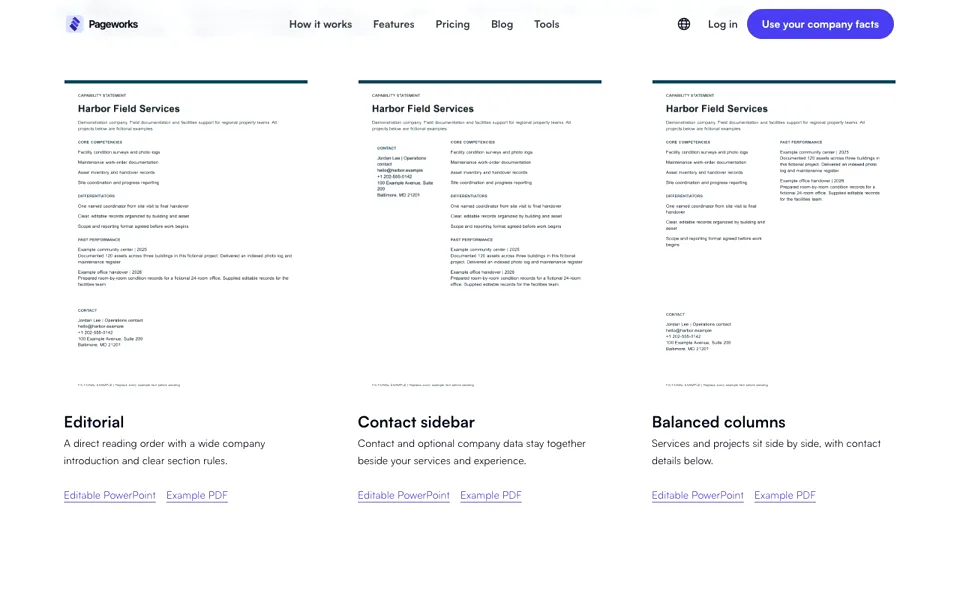
Editorial
A direct reading order with a wide company introduction and clear section rules.
US SUPPLIER ONE-PAGERS
Start with an original, editable US Letter template. See what each section does, replace the fictional company details and prepare a concise introduction for the buyer you want to reach.
Adapt the downloadable fictional examples with your own company facts. Account export access follows the current app plan.
Downloadable examples follow the page language. Changing the interface language does not translate your company document text.
THE ESSENTIALS
A capability statement template is a reusable layout for a short company introduction. These three US Letter examples place services, differentiators, project experience and contact details on one page. Replace the fictional wording and images with your own facts, then choose the information relevant to the buyer you are approaching.
Structure reference: VA capability statement guidance (PDF).
Create a capability statement from your company factsHarbor Field Services is a fictional demonstration company, not a customer or testimonial. Every project and number in these examples is invented solely to show how a completed page is organized. No credentials are claimed.
A direct reading order with a wide company introduction and clear section rules.

Contact and optional company data stay together beside your services and experience.

Services and projects sit side by side, with contact details below.
A FILLED EXAMPLE, SECTION BY SECTION
Harbor Field Services is a fictional company. These edited teaching examples use invented work and numbers; they are not customer evidence or text the app generates for you.
What work do you do, and for whom?
Field documentation and facilities support for regional property teams.
Which specific service fits this introduction?
Maintenance work-order documentation.
Which concrete practice can you support?
One named coordinator from site visit to final handover.
What was your role and what did you deliver?
An indexed photo log and maintenance register for a fictional three-building project.
Your review: replace the invented company, project counts, results and contact details. Keep only evidence you may share. Do not invent client names, certifications or identifiers to fill a blank.
The current local version organizes text you supply. It does not crawl websites, infer credentials, draft unsupported results or automatically extract PDF/DOCX files. PowerPoint edits made after download do not update the saved source.
Read the exact company name, contact details and identifiers in the exported file. Check long addresses, project descriptions and image proportions. Keep the page at 8.5 x 11 inches. A capability statement is an introduction, not supplier registration or a promise of contracts.
Use a short company introduction, buyer-relevant competencies, concrete differentiators, supported project experience and a direct contact route. Add verified company identifiers when appropriate. The VA sample provides a useful structure, but the buyer’s current instructions take priority. Sources: VA guidance (PDF)
Choose Editorial for a direct top-to-bottom introduction. Choose Contact sidebar to keep contact and optional company details beside your services. Choose Balanced columns when services and project experience deserve comparable space. They use the same company facts and US Letter page size; the layout does not establish procurement compliance.
Yes. Each example is a portrait US Letter page, 8.5 x 11 inches, with editable text and separate image objects. Replace every fictional fact, logo and image. Check wrapping after edits and export your finished PDF from your PowerPoint version. An edited download does not update a private document saved in the app.
Yes. The three original PDF examples and editable PowerPoint examples are available here without an account. They are fictional demonstrations you can adapt. Creating, saving and exporting your own document in the app follows the current eligible-plan access; downloading an example does not change that access.
Leave the corresponding template fields out instead of inventing values. For a procurement opportunity, check what that buyer actually requires. SAM.gov distinguishes a UEI-only request from entity registration; making a one-pager performs neither. Verify NAICS classifications against the Census Bureau source rather than presenting a code as a certification. Sources: SAM.gov · U.S. Census NAICS
Select the services and evidence relevant to one buyer, remove repeated claims and keep a clear contact route. Move supplementary detail into a separate supporting document if the buyer permits it. In the app, content that does not fit returns a section-specific error; it is not silently deleted or made unreadably small.
These files are single-page US Letter layouts, not A4 or multi-page brochures. You can adapt the wording for a commercial introduction, but a different country, buyer or tender may require a different size, structure or registration process. Confirm those requirements before using a template.
CHECK THE ORIGINAL GUIDANCE
Use these primary sources for the document conventions and identifier checks. They do not endorse this product, verify the example company or guarantee contract eligibility.
Sources are in English
Document structure, concise service descriptions and relevance to a particular buyer. This older sample includes legacy identifier terminology; use SAM.gov for current UEI and registration guidance.
Current official explanation of entity registration and a UEI-only request. A company one-pager does not complete either process.
Official classification definitions and code search. A NAICS code describes an industry; it does not certify a business or prove contract eligibility.
Links and relevant guidance checked . Follow the current buyer instructions if they differ from an example.
Start with facts you can stand behind, then tailor the page to one buyer.
Create your company one-pagerIntroduce your company with a clear one-page profile.