
Client quotation
Marketing project
Example clientIssued
20/10/2026
- Subtotal
- GBP 900.00
- Discount
- GBP 90.00
- Tax
- GBP 81.00
- Total
- GBP 891.00
Keep control of the numbers.
Use your own rates. Review quantities, discounts and tax before you save.
Make the scope clear.
Put the brief, deliverables, stages and payment terms into words you can edit.
Bring the same story to the meeting.
Create editable slides from that proposal. Keep a clear link to the saved estimate.
What does this quotation maker prepare?
Pageworks helps agencies and independent professionals prepare a priced service quotation, an editable client proposal and presentation slides from one saved estimate. You enter the services, rates, scope and terms. The calculation and proposal assembly do not use AI.
- Your inputs
- Client brief, services, quantities, rates, scope, stages and terms.
- Your outputs
- Estimate and proposal: DOCX, PDF or HTML. An editable presentation uses your existing PPTX export access.
- Access
- New estimates and materials require Client Kit and an active paid subscription.
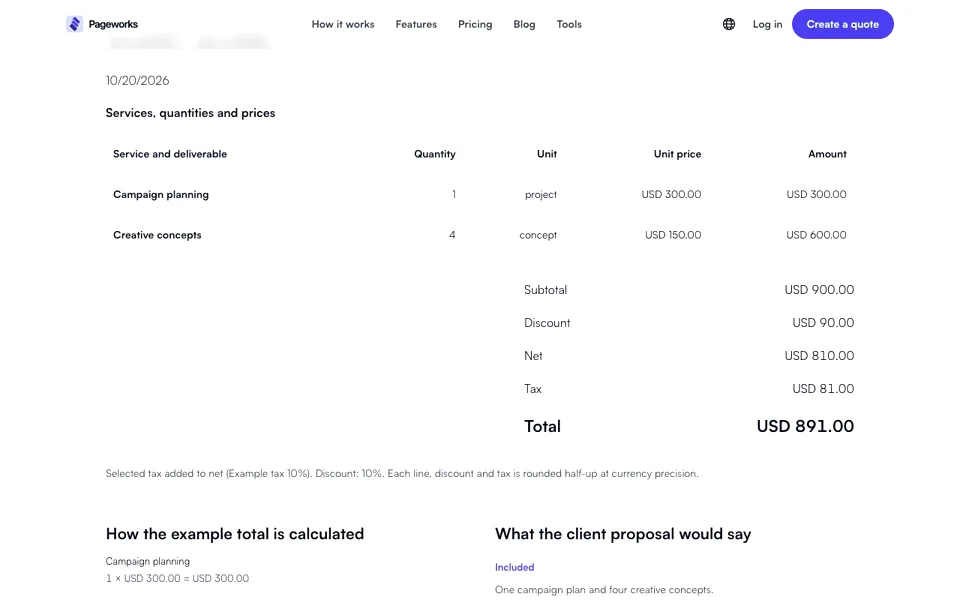
A service quotation for a marketing project
Illustrative prices only, not market rates or a recommendation. The example explicitly selects a 10% discount and a 10% added tax. Choose taxes and rates for your own situation; no tax is selected by default.
20/10/2026
| Service and deliverable | Quantity | Unit | Unit price | Amount |
|---|---|---|---|---|
| Campaign planning | 1 | project | GBP 300.00 | GBP 300.00 |
| Creative concepts | 4 | concept | GBP 150.00 | GBP 600.00 |
- Subtotal
- GBP 900.00
- Discount
- GBP 90.00
- Net
- GBP 810.00
- Tax
- GBP 81.00
- Total
- GBP 891.00
Selected tax added to net (Example tax 10%). Discount: 10%. Each line, discount and tax is rounded half-up at currency precision.
How the example total is calculated
- Campaign planning1 × GBP 300.00 = GBP 300.00
- Creative concepts4 × GBP 150.00 = GBP 600.00
The two line amounts add to 900.00. A chosen 10% discount removes 90.00, leaving 810.00. The chosen 10% added example tax is 81.00, giving a total of 891.00. These are illustrative inputs, not a recommended tax rate or service price.
What the client proposal would say
- Included
- One campaign plan and four creative concepts.
- Excluded
- Photography, printing and advertising spend.
- Handover
- Review the campaign plan, review the concepts, then deliver final files.
- Still to agree
- Dates, payment terms and the number of revision rounds.
Prepare a proposal from the brief and quote
- 1
Set out the project
Add the client brief, your scope, exclusions, delivery stages, payment terms and relevant company or case materials. Leave unknown facts open.
- 2
Review the estimate
Enter items manually or paste four tab-separated columns from your price list. Review the rows, line totals, discount and tax before saving.
- 3
Save a version and prepare the proposal
The proposal arranges your own source material without AI. Edit the narrative while the price table continues to use that saved estimate.
- 4
Create the presentation
Prepare an editable presentation from the same proposal and calculated total. Open it in the existing editor and export PPTX. Longer text can create more slides.
Send the document. Present the thinking.
Send the numbers.
Export your saved estimate with its itemised services, discount, tax and total.
Explain the proposal.
Edit your scope, delivery stages and terms, then prepare the document for your client.
Present the thinking.
Open the slides in the presentation editor. PPTX downloads follow your existing export access.
Files keep the saved version they were created from. If prices change, prepare and export a new version. Edits made in the presentation stay separate.
No XLSX or HWP export, formula execution, e-signatures, CRM or accounting integration is included.
Answers before you create a client quotation
What should I include in a service quotation?
Start with the supplier and client, document number, issue date and validity period. Add services, quantities, unit prices and currency, then review discount, tax, scope, exclusions, milestones and payment terms. These are practical review fields, not a claim that the document satisfies every legal requirement.
Does the example tax represent UK VAT?
No. The example deliberately uses a fictional 10% added tax to explain the calculation. It is not a UK VAT recommendation. You select the appropriate tax mode and rate for your own transaction; no tax is selected by default.
Does this create an invoice or a legally checked contract?
No. It prepares a quotation and proposal materials, not an invoice or a reviewed contract. GOV.UK explains invoice information separately. CMA guidance addresses fair and transparent terms in consumer contracts; it does not mean every business-to-business proposal has the same rules. Review your own commitments and circumstances.
Should I send DOCX, PDF or HTML?
Use DOCX when the recipient needs to edit the text, PDF to share a document with a page layout, or HTML to open it in a browser. Adobe explains the PDF format. In Pageworks, download a newly saved version after changes; an earlier file does not update itself.
Can I use UK currency and dates?
Yes. The UK example uses GBP, UK dates and A4; the US example uses USD, US dates and Letter. Choose one currency per document. Changing display settings does not convert prices or make tax choices for another country.
Can I paste a price list from Excel?
Yes, as four tab-separated text columns: service, quantity, unit and unit price, up to 100 rows. Use a decimal point with no currency symbols or thousands separators. Review and confirm the rows. Spreadsheet file import, formula execution and XLSX export are not supported.
What happens if the quote changes after I prepare a proposal?
Each proposal uses a specific saved estimate version. Changed prices flag older materials; downloaded files stay unchanged. Prepare a new version explicitly, keeping your edited proposal text if needed. Presentation edits remain separate.
Is document creation free?
No. You can inspect this fictional worked example without signing in. Creating estimates and new materials requires Client Kit and an active paid subscription. Check current availability in the app’s Add-ons area. This page does not provide free document creation or downloads.
Original example and primary sources
The calculation and sample scope above are original Pageworks examples. The external guides below cover their stated topics; they do not certify this tool or its documents.
- GOV.UK: invoice informationGOV.UK
Explains invoices, a document this quotation workspace does not issue.
- CMA: fair customer contractsCompetition and Markets Authority
Consumer-contract guidance, not a certification or a rule for every B2B proposal.
- Adobe: the PDF formatAdobe
Background on sharing a document with a page layout.
Pageworks · Content reviewed:
Prepare a quotation your client can review.
Create a quotationNew estimates and materials require Client Kit and an active paid subscription. Check availability and current terms in the app’s Add-ons area.
Sales presentation examplesQuote and estimate maker
Prepare a clear quote or proposal for your client.
Read the steps
- Explore the example with line items, totals and terms.
- Check the currency, amounts and wording before sharing.
- Open the workspace to enter your details and download your document.