
Turn a Presentation into a Client Proposal: Full Example
“Can you send something I can forward?” A presentation rarely answers that request on its own. The person receiving it needs enough context to make a decision without you in the room.
Choose the direction of the task
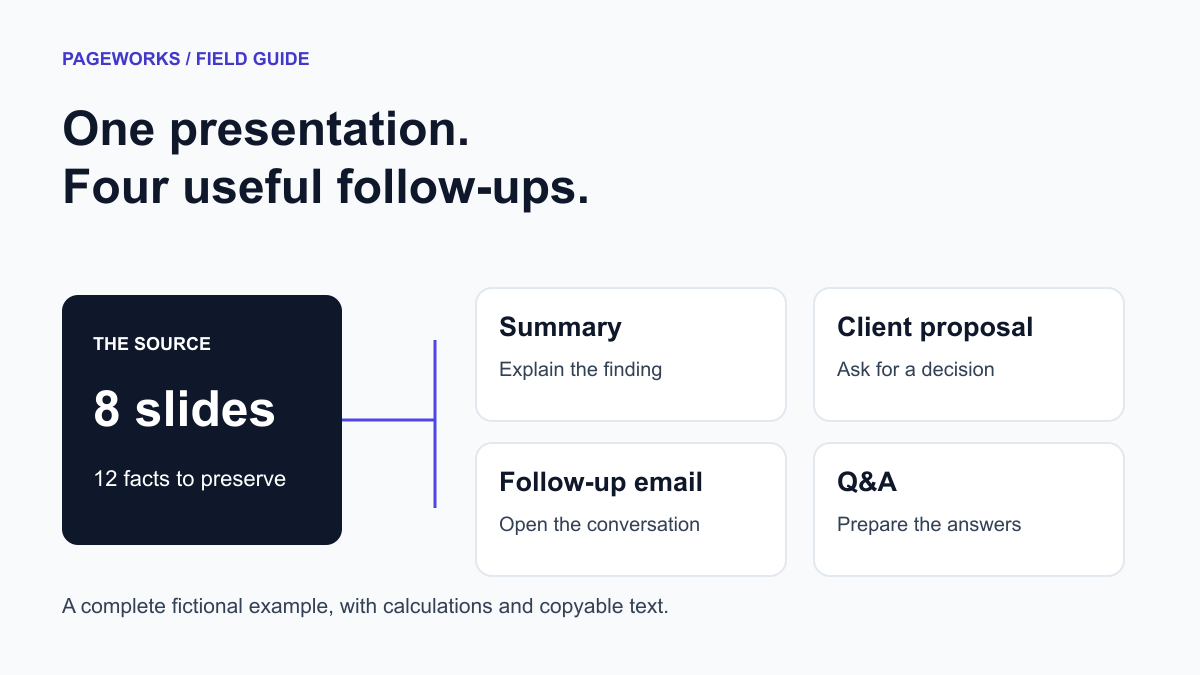
This guide turns an existing presentation into a written client proposal and follow-up packet. If you need slides for presenting a proposal, use the eight-slide source below as a starting structure, then build the deck from your approved brief. The two outputs share facts but serve different moments in the sales process.
You can turn a presentation into a client proposal by extracting the evidence, separating observations from recommendations, and writing four sections: goal, proposed scope, measurement and decision required. The hard part is keeping a tentative next step from becoming an accidental promise.
Below is a complete worked example: one eight-slide source becomes a summary, a client proposal, a follow-up email and four questions with answers. Copy the text, replace the facts and keep the distinctions. You do not need a new product feature to use the method.
Start with a small source you can audit
Our example describes an onboarding pilot: 40 participants, 14 days, 28 completions. Ten completers were interviewed, and six mentioned setup friction. Median setup time among completers was 18 minutes. There was no control group and no earlier setup-time baseline.
That is enough information for a useful follow-up. It is not enough to claim that a new process improved onboarding, that most participants struggled, or that another project has been agreed.
| Slide | Purpose | Content to preserve |
|---|---|---|
| 1 | The decision | Decide whether to design a second onboarding pilot. No follow-up has been approved. |
| 2 | Pilot scope | Forty participants were invited to a 14-day onboarding pilot. |
| 3 | Completion | Twenty-eight of 40 participants completed onboarding: 70%. Twelve did not complete. |
| 4 | Setup time | Median setup time among the 28 completers was 18 minutes. There is no pre-pilot baseline. |
| 5 | Interview findings | Ten completers were interviewed. Six reported setup friction: 60% of interviewees. |
| 6 | Limits | There was no control group. Interviewees were a subset of completers. The observations do not establish improvement or causation. |
| 7 | Candidate next step | Consider a second pilot with revised setup instructions and a predefined comparison. This is a recommendation. |
| 8 | Open decisions | Budget, owner and follow-up dates have not been supplied. No follow-up work is approved. |
Build a 12-item fact sheet before rewriting
The fact sheet below includes counts, derived figures, limitations and decision status. A useful source sheet records what is unknown as carefully as what is known. Otherwise a fluent proposal can quietly supply its own budget or deadline.
| ID | Item | Value | Meaning / limit |
|---|---|---|---|
| F01 | Participants invited | 40 | Invitations, not customers |
| F02 | Participants completing onboarding | 28 | Completed within the pilot window |
| F03 | Pilot duration | 14 days | One cohort |
| F04 | Completion rate | 70% | 28 ÷ 40; derived |
| F05 | Participants not completing | 12 | 40 − 28; derived |
| F06 | Interview participants | 10 | Subset of the 28 completers |
| F07 | Interviewees reporting setup friction | 6 | 6 of 10 interviews, not 6 of 40 |
| F08 | Setup-friction share among interviewees | 60% | 6 ÷ 10; derived |
| F09 | Median setup time among completers | 18 minutes | No pre-pilot baseline |
| F10 | Control group | None | No causal comparison |
| F11 | Follow-up budget and approval | Not supplied; not approved | No authorized commercial commitment |
| F12 | Candidate next step | A second, revised onboarding pilot | Recommendation, not an agreed project |
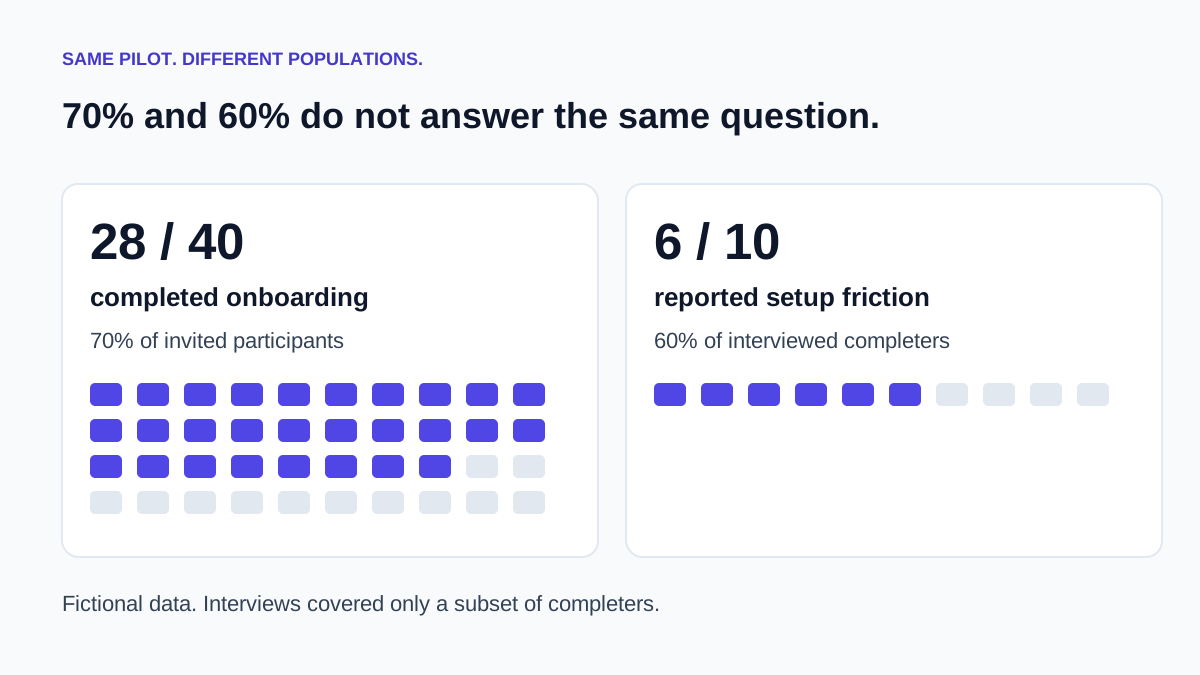
Three calculations are straightforward: 28 ÷ 40 × 100 = 70% completion; 40 − 28 = 12 non-completers; 6 ÷ 10 × 100 = 60% of interviewees reporting friction. What you cannot calculate from these facts is improvement over the old process, the friction rate for all 40 invitees, or a before-and-after time saving.
There is also a selection issue: the interviews cover completers. The source does not tell us why the other 12 people stopped. Asking them could change the story. A proposal that immediately promises a fix would skip that unanswered question.
Material 1: a summary someone can forward
A summary should let the next reader understand the finding, its limits and the decision. In this example it can remain under 100 words without losing the denominator or pretending there was a controlled experiment.
The sentence about the missing baseline earns its space. Remove it and “18 minutes” can sound like a performance improvement even though it is only an observed median. Concision is not a reason to remove the qualification that makes a number honest.
Material 2: the client proposal
A proposal has a different job. It asks the recipient to consider a course of action. It should distinguish the evidence you already have from the work you propose and the authorization you still need.
Goal
Evaluate whether revised setup instructions merit a further onboarding pilot. The initial 14-day pilot had 28 completions from 40 invited participants. Six of 10 completers interviewed reported setup friction; the interview finding is a reason to investigate, not an estimate for every participant.
Proposed scope
Review the current setup instructions, identify candidate revisions and draft a pilot plan for approval. These are proposed activities, not work already agreed. Confirm whether interviews with non-completers are feasible before adding them to scope.
Measurement
Define the primary outcome, denominator and observation window before recruitment. Record completion and setup time. Decide how to establish a comparison; the first pilot had no control group or setup-time baseline. Do not commit to a percentage improvement in advance.
Decision required
Please confirm whether to develop the plan, who would own it, and the budget and dates available for consideration. No delivery commitment or price is included because none has been supplied.
Notice the missing price and delivery date. Those are unresolved inputs, not drafting defects. A plausible invented fee would make the document look complete while making it less safe to send. Add commercial terms only after someone with authority supplies or approves them.
Material 3: the follow-up email
The email needs one clear next step. It does not need to repeat the whole proposal or imply that a meeting took place when the source never mentioned one.
“Would you like to explore…” leaves the decision with the recipient. “We will launch…” would assert approval that the source does not contain. This is a small wording change with a large practical consequence.
Material 4: four questions to prepare for
Was the pilot successful?
It recorded a 70% completion rate within 14 days. The source gives no predefined success threshold, control group or baseline, so we cannot conclude that it improved the process or met a stated target.
Did most participants report setup friction?
We do not know. Six of the 10 interviewees reported friction. Those interviewees were selected from the 28 completers; the result does not describe all 40 invited participants.
What would the follow-up cost?
No budget or price has been supplied. The next commercial step is to establish scope and constraints before proposing terms.
What should happen next?
One option is to develop a second-pilot plan with revised instructions and a predefined comparison. The owner, budget, dates and approval still need to be established. That is a recommendation, not a report of an agreed project.
Four tempting rewrites that change the facts
| Tempting sentence | What went wrong | A defensible version |
|---|---|---|
| “Onboarding improved by 70%.” | 70% is completion, not improvement. | “28 of 40 invitees completed onboarding.” |
| “60% of participants struggled.” | The denominator changed from interviewees to all participants. | “6 of 10 interviewees reported setup friction.” |
| “Setup time fell to 18 minutes.” | There is no earlier baseline. | “Median setup time among completers was 18 minutes.” |
| “We will launch the next pilot.” | A proposal became an approved commitment. | “A second pilot is an option for approval.” |
All four bad sentences sound ordinary. None needs a bizarre hallucination to cause trouble. That is why proofreading only for spelling or tone misses the important work.
A prompt you can reuse
For a longer deck, first ask for the fact sheet and review it. Then generate each material from that checked sheet. Keep the original slides alongside it: a source sheet can omit context too.
How to use this with Pageworks
The eight-slide example fits within Pageworks Free’s ten-slide allowance. Start with the source brief, review the outline and build the presentation. You can use the downloadable summary, proposal, email and Q&A as editable starting points alongside it. For this small example, buying a larger slide allowance is unnecessary.
For larger reports or regular client work, Pro starts at $5.99 and supports up to 50 slides per presentation, with no daily creation limit. It adds Smart generation, uploads up to 100 MB, editable PowerPoint, high-quality PDF and watermark-free exports and sharing. For example, a 24-slide review fits within Pro’s stated slide limit; it exceeds Free’s limit by 14 slides. That is a capacity comparison, not a recommendation to make your deck longer.
Choose the output for the recipient: Free’s PDF or slide-image PPTX can support viewing and presenting; use Pro’s editable PowerPoint when colleagues need to revise the slides. Inspect the export, since editability depends on the layout. The four prose templates in this guide remain available to download without an add-on purchase.
- Create a presentation from your source
- How to turn notes and documents into a deck
- Compare presentation workflows
Before you send the packet
- Check each number against the source, including its denominator and time period.
- Search for commitment words such as “will,” “approved,” “guaranteed” and “agreed.” Confirm that the source supports each one.
- Mark whether each unresolved item is a question, a proposed next step or an approved decision.
- Remove stale drafts so the recipient can tell which version to use.
The finished packet is four documents with four jobs. The summary explains; the proposal asks; the email opens the next conversation; the Q&A prepares you to answer it. They should sound different while telling the same story about the evidence.
Keep the written proposal and presentation in sync
After the client requests a change, update the source fact sheet first. Then check the scope, figures and decision status in the deck, proposal and follow-up email. If the scope changes but the price has not been approved, leave the commercial decision explicit rather than carrying over a plausible amount from an earlier version.
- Name one owner for the approved source and record its version date.
- Map each commercial commitment to the supplied scope or an approved decision. Keep recommendations distinct from agreed work.
- Before sending, compare the numbers and next steps across all four outputs. The summary can be shorter, but it must not promise more than the proposal.
The conversion method and downloadable text are usable alongside Pageworks; they do not depend on an automatic proposal-writing add-on. Pageworks creates the presentation from the source. Use the supplied prose templates in your document editor and review the commercial terms before sending.
Build a proposal that sells
Build around the decision you want. Use Pageworks to turn your approved evidence into slides you can refine and confidently share.
Create my presentationRelated articles
Dec 20, 2025 · 2 min read
AI Presentations for Business: How to Boost Your ROI

Nov 1, 2026 · 3 min read
A 13-slide pitch deck outline for founders

Oct 8, 2026 · 2 min read
Consulting Presentation Structure: An Answer-First Example